Service Commands
A Cumulocity operator can perform operations on a service of a device: start it, stop it, restart it, or run any other action that service supports. This is the Cumulocity feature documented under service commands.
The mapping details are described in the Cumulocity mapper reference.
Declaring the supported service commands
The service commands are managed using the init system or service plugins and different service types are managed by different plugins.
Hence, when a service is registered with its service name and type in the name and type fields respectively, the type determines the init system or the plugin that would be used to manage that service.
The name is used as the target service identifier when service commands are executed.
- tedge
- mosquitto
- mqtt
tedge mqtt pub -r 'te/device/main/service/collectd' '{
  "@type": "service",
  "@parent": "device/main//",
  "type": "service",
  "name": "collectd"
}'
mosquitto_pub -r -t 'te/device/main/service/collectd' -m '{
  "@type": "service",
  "@parent": "device/main//",
  "type": "service",
  "name": "collectd"
}'
te/device/main/service/collectd
{
  "@type": "service",
  "@parent": "device/main//",
  "type": "service",
  "name": "collectd"
}
If auto-registration is enabled,
a service that is not registered yet is registered with the default type service
when it declares its actions.
A service declares the actions that it supports
in the actions array of a retained message on its cmd/control topic.
- tedge
- mosquitto
- mqtt
tedge mqtt pub -r 'te/device/main/service/collectd/cmd/control' '{
  "actions": [
    "restart",
    "pause"
  ]
}'
mosquitto_pub -r -t 'te/device/main/service/collectd/cmd/control' -m '{
  "actions": [
    "restart",
    "pause"
  ]
}'
te/device/main/service/collectd/cmd/control
{
  "actions": [
    "restart",
    "pause"
  ]
}
The declared actions are copied, with their case and order,
to the c8y_SupportedServiceCommands fragment of the service managed object.
A custom action such as pause is declared the same way as a standard one.
An action whose name breaks the action name rule is not declared to Cumulocity at all, and the mapper logs why.
Creating a service command operation
Create a service command operation from Services > service name > Commands.
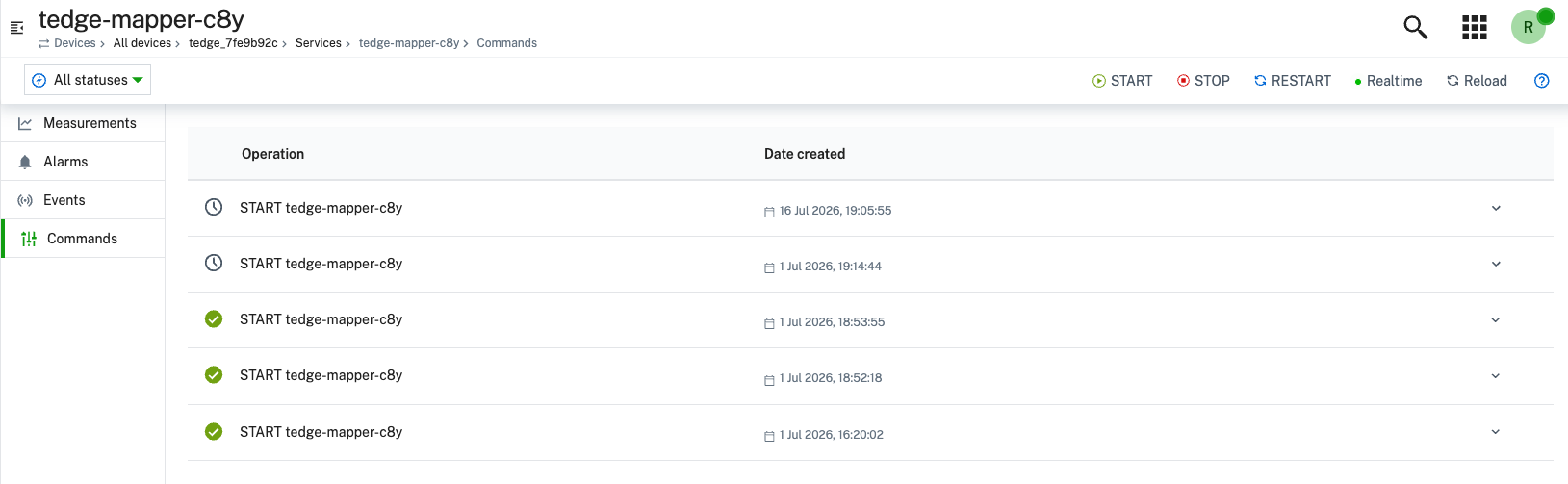
The operation is sent to the device,
where tedge-agent runs the action on the service with the control workflow.
The operation moves to SUCCESSFUL or FAILED when the workflow ends.
Rejected operations
An operation is failed straight away, with no thin-edge.io command published, when:
- the target service cannot be resolved.
- the action is not one the service has declared.
The action name is compared with its case, so
RESTARTdoes not match a declaredrestart. - the operation's
serviceNameorserviceTypebreaks the rule for that argument.
Removing an action
An action is removed by publishing the cmd/control message again without that action.
- tedge
- mosquitto
- mqtt
tedge mqtt pub -r 'te/device/main/service/collectd/cmd/control' '{
  "actions": [
    "restart"
  ]
}'
mosquitto_pub -r -t 'te/device/main/service/collectd/cmd/control' -m '{
  "actions": [
    "restart"
  ]
}'
te/device/main/service/collectd/cmd/control
{
  "actions": [
    "restart"
  ]
}
The action is removed from the c8y_SupportedServiceCommands fragment of the service managed object.
Clearing the cmd/control topic with a retained empty message removes all the actions.
- tedge
- mosquitto
- mqtt
tedge mqtt pub -r 'te/device/main/service/collectd/cmd/control' ''
mosquitto_pub -r -t 'te/device/main/service/collectd/cmd/control' -m ''
te/device/main/service/collectd/cmd/control
<<empty>>
Disabling service commands
To disable service commands from Cumulocity,
set c8y.enable.service_control to false and restart the mapper.
tedge config set c8y.enable.service_control false
sudo systemctl restart tedge-mapper-c8y
The mapper then ignores the cmd/control capabilities of the services and the c8y_ServiceCommand operations.
Disabling service commands keeps what the mapper created while they were enabled:
the c8y_ServiceCommand operation file under /etc/tedge/operations/c8y/<service-external-id>,
and the c8y_SupportedServiceCommands fragment of the service managed object.